
So you’re thinking about buying a Spinfire tennis ball machine, but you’re stuck between the Pro 1 and the Pro 2. You’re not alone. This is one of the most common questions we get from tennis players across South Africa — from beginners in Durban to competitive club players in Johannesburg and coaches running programmes in Cape Town.
Both machines come from the same Australian manufacturer. Both look similar on the outside. And both promise to make your solo practice sessions more productive. But once you look under the hood, the differences become clear — and they matter more than you might think.
In this guide, we’ll walk you through every meaningful difference between the Spinfire Pro 1 and Pro 2 so you can make a confident decision. No jargon, no fluff — just straightforward answers.
The Spinfire Pro 2 — packed with upgrades over its predecessor
The Quick Answer: What’s the Main Difference?
If you’re short on time, here’s the bottom line.
The Spinfire Pro 1 is the entry-level model. It gives you solid fundamentals — good speed, spin, and the same internal oscillation that Spinfire is known for. It does the basics well and costs less.
The Spinfire Pro 2 is the full package. It adds a smartphone app with an AI Drill Creator, a dedicated remote control, programmable drills, vertical random mode, two-line drills, automatic variation, and Single Ball Fire mode. These aren’t minor upgrades — they change the way you train.
Think of it this way: the Pro 1 is a reliable practice partner that feeds you balls. The Pro 2 is a smart training partner that adapts to how you want to play.
Now let’s break down each difference in detail.
Side-by-Side Comparison: Spinfire Pro 1 vs Pro 2
| Feature | Spinfire Pro 1 | Spinfire Pro 2 |
|---|---|---|
| Ball Speed | 32–130 km/h | 32–130 km/h |
| Ball Capacity | 150 balls | 150 balls |
| Feed Interval | 2–15 seconds | 2–15 seconds |
| Spin | Topspin & Backspin | Topspin & Backspin (10 levels each) |
| Elevation | Groundstroke to Lob | Groundstroke to Extreme Lob (60°) |
| Internal Oscillation | ✅ Yes | ✅ Yes |
| Horizontal Random | ✅ 3 width settings | ✅ 3 width settings |
| Vertical Random | ❌ No | ✅ Yes |
| Two-Line Drill | ❌ No | ✅ 3 width settings |
| Automatic Variation | ❌ No | ✅ Speed, spin & interval |
| Single Ball Fire (SBF) | ❌ No | ✅ Yes |
| Smartphone App | ❌ No | ✅ iOS, Android & Apple Watch |
| AI Drill Creator | ❌ No | ✅ Yes |
| Programmable Drills | ❌ No | ✅ Custom + pre-programmed |
| Remote Control | ✅ Basic | ✅ Slimline Remote (credit-card sized) |
| Pickleball Convertible | ❌ No | ✅ With conversion kit |
| Padel Compatible | ❌ No | ✅ With dedicated software |
| Weight | 18–24 kg | 18–24 kg |
| Warranty | 2 years | 2 years (extendable to 5) |
The specs that are identical — ball speed, capacity, feed interval, weight, and dimensions — tell you that both machines are built on the same solid platform. Where they differ is in the intelligence and versatility of the training experience.
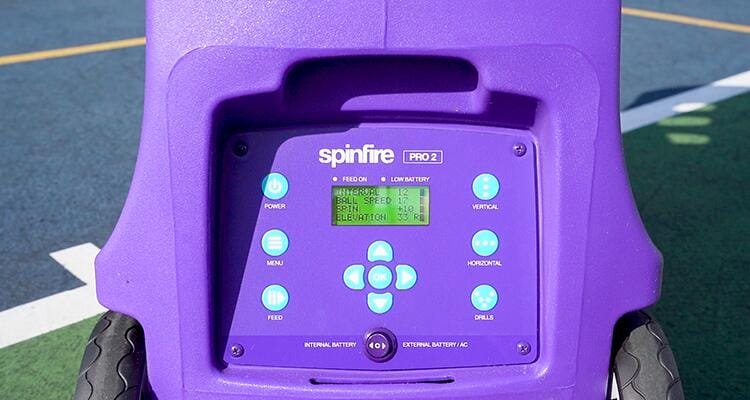
The backlit LCD display shows all your settings at a glance
1. The Smartphone App and AI Drill Creator — A Game Changer
This is the single biggest difference between the two machines, and it’s worth spending some time on.
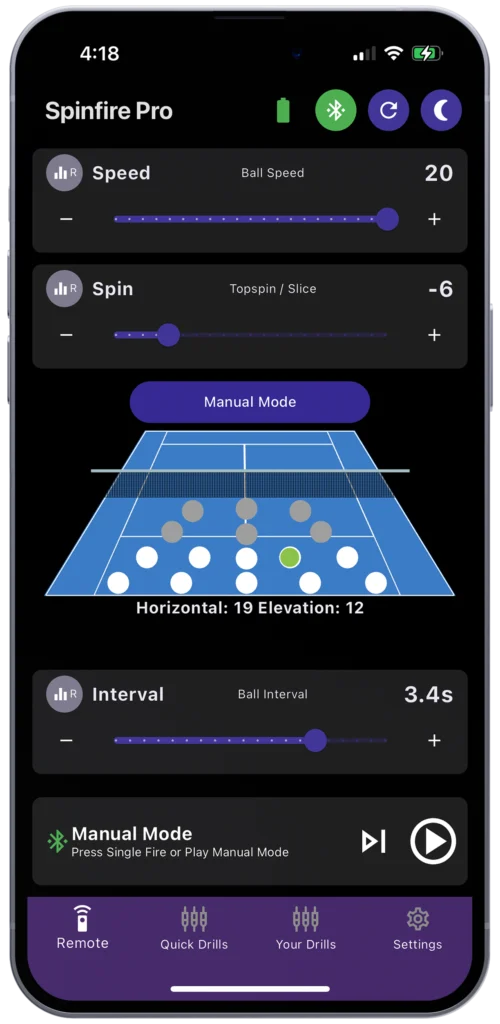
The Pro 2 comes with a free smartphone app for iPhone, Android, and even Apple Watch. With this app, you can do things that simply aren’t possible with the Pro 1:
- Create custom drills with precise shot placement, speed, spin, and timing for each ball
- Use the AI Drill Creator — describe the drill you want in plain language, and the AI builds it for you
- Save unlimited drills to your phone so you and your family or training partners can each have personalised programmes
- Share drills with other Spinfire owners (great for coaches who want to send homework to students)
- Update the machine’s software directly through the app
The Pro 1 doesn’t have any of this. You control it from the machine’s panel and a basic remote. That’s perfectly fine for straightforward practice, but it limits how creative and targeted your sessions can be.
Here’s a practical example. Let’s say you keep losing points on short balls to your forehand. With the Pro 2’s app, you can programme a drill that feeds a deep ball, then a short ball to your forehand side, then a deep ball again — mimicking the exact pattern that gives you trouble in matches. With the Pro 1, you’d need to manually adjust settings between each type of shot, which breaks the flow of your practice.
The Spinfire App lets you tap exactly where you want each ball to land
2. Remote Control: Pocket-Sized Convenience
Both machines come with a remote, but they’re not the same.
The Pro 2 includes the Slimline Remote — a tiny device about the size of a credit card and roughly 6mm thick. It weighs almost nothing, slips into your pocket, and the battery lasts for months. You can adjust every setting from your side of the court: speed, spin, elevation, feed rate, horizontal direction, and drill selection.
This matters more than you’d expect. Nobody wants to walk back to the baseline every time they need to change a setting. And if you’re coaching a student, you want to make adjustments on the fly without interrupting the session.
On top of the physical remote, the Pro 2 also lets you use the smartphone app or an Apple Watch as a remote — so you’ve got four different ways to control the machine. The Pro 1 gives you two: the control panel and a basic remote.
3. Vertical Random Mode
The Pro 1 offers horizontal random mode, which sends balls randomly left and right across the court at three width settings (narrow, medium, and wide). That’s great for working on lateral movement and getting comfortable hitting from different positions.
The Pro 2 adds vertical random mode on top of this. Vertical random feeds short balls and deep balls in a random order. This forces you to read the depth of each shot, move forward and back, and decide whether to attack or stay defensive.
When you combine both horizontal and vertical random together on the Pro 2, you get something that closely simulates playing against a real opponent. Balls arrive at different widths and different depths, keeping you guessing every time. This is the most realistic practice mode you’ll find in any ball machine at this price point.
The Pro 1 can only randomise side to side — not short and deep. So your depth stays the same throughout each session.
4. Two-Line Drill
The two-line drill is a favourite feature among Pro 2 users. It alternates balls between two sides of the court, working on your forehand and backhand in sequence.
What makes it special is the three width settings:
- Narrow: Small movements, focused on grip changes and technique. Great for warming up or working on transitions between forehand and backhand.
- Medium: More court coverage, building both technique and fitness.
- Wide: Full singles court width. This is a proper workout that tests your footwork, speed, and endurance.
You can also combine the two-line drill with vertical random, which adds depth variation to the alternating shots. This creates drills that are genuinely challenging even for advanced players.
The Pro 1 doesn’t have this drill built in. You can manually set it to feed to one side, then adjust — but that’s a far cry from the seamless, automatic alternation of the Pro 2.
The two-line drill in action — alternating forehands and backhands at medium width.
5. Automatic Variation
This is a feature that was added to the Pro 2 in 2023, and it’s one that often goes under the radar.
Automatic Variation lets the machine gradually change the speed, spin, and feed interval as you play. Instead of hitting the same ball over and over at the same pace, the machine subtly shifts things around so your session feels more dynamic and unpredictable.
For example, the speed might start at 80 km/h and slowly increase to 110 km/h over the course of a drill. Or the spin might shift from flat to moderate topspin. This keeps your brain and body engaged because you’re constantly adapting — just like in a real match.
The Pro 1 keeps things consistent. Whatever speed and spin you set is what you get throughout the session. That’s useful for repetition-based practice, but it doesn’t push you to adapt the way Automatic Variation does.
6. Single Ball Fire (SBF) Mode
If you’re a coach — or if you plan to use the machine with a training partner — this feature is incredibly useful.
Single Ball Fire lets you fire just one ball at the press of a button. This is perfect for:
- Coaches who want to feed a ball, then stop to discuss technique with a student
- Testing specific settings before running a full drill
- Working on serve returns with controlled pacing
The Pro 1 runs continuously once you start it. You can pause and restart, but there’s no single-shot option. SBF gives the Pro 2 a level of precision that the Pro 1 simply can’t match for coaching situations.
7. Pickleball and Padel Compatibility
Here’s something many South African players don’t realise: the Pro 2 is a multi-sport machine.
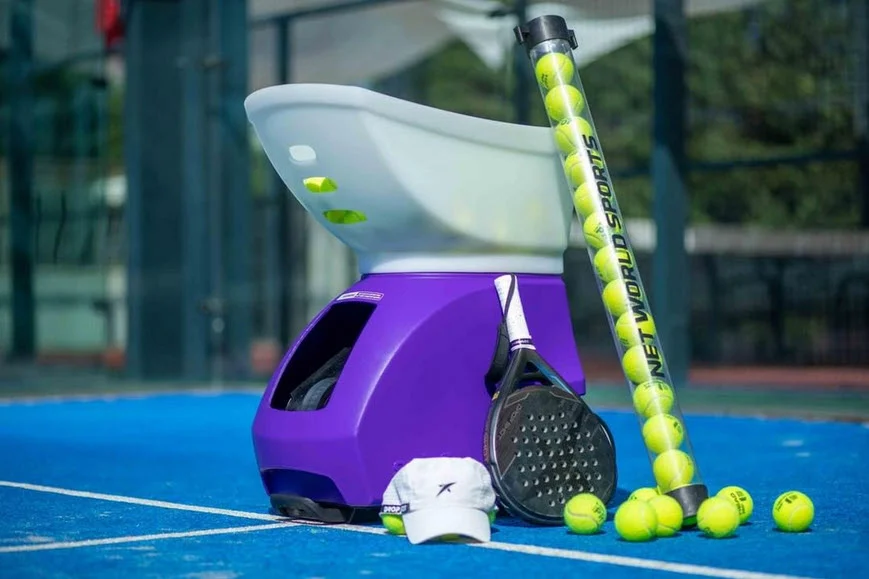
With the Spinfire Pickleball Conversion Kit, you can turn the Pro 2 into a dedicated pickleball ball machine. And with built-in padel software, it works for padel training too.
This is relevant because both pickleball and padel are growing rapidly in South Africa. If you play more than one racket sport — or if you’re a coach working with players across different sports — the Pro 2 gives you one machine for three sports.
The Pro 1 is a tennis-only machine.
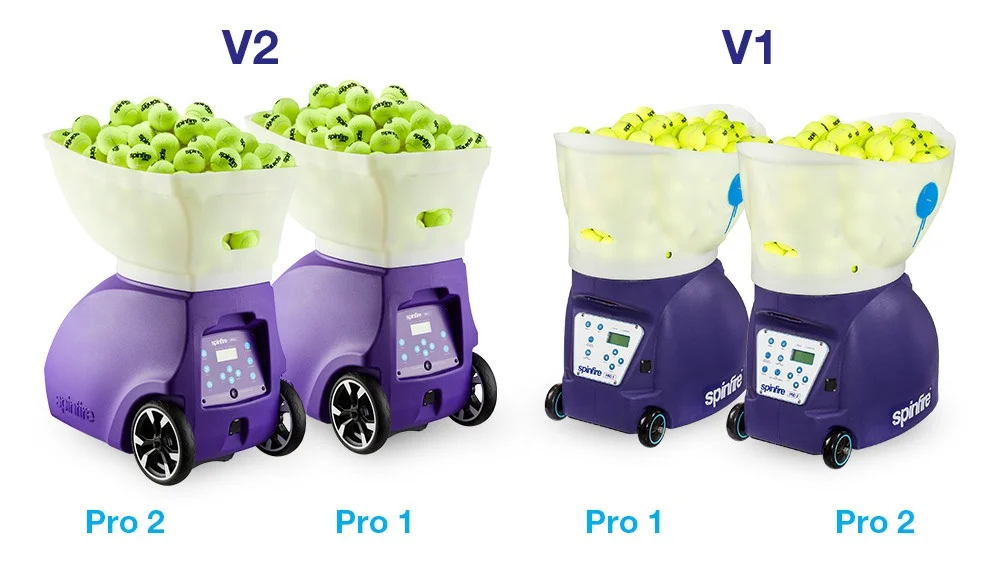
What About the Pro 2 V1 vs V2?
This causes some confusion, so let’s clear it up quickly.
The Spinfire Pro 2 has gone through two versions:
- V1 — Sold before October 2020. Has a white control panel.
- V2 — Sold from October 2020 onwards. Has a black control panel.
The V2 brought several improvements over the V1, including improved ball variations (true random instead of sweeping oscillation), better portability features, and improved reliability. If you’re buying new, you’ll automatically get the V2. But if you’re looking at a used Pro 2 in South Africa, check the control panel colour — black means V2, white means V1.
The V2 also introduced the AI-powered Drill Creator in the app and Bluetooth connectivity for machines purchased from July 2024 onwards.
Both versions are solid machines, but the V2 is noticeably more refined.
Who Should Buy the Spinfire Pro 1?
The Pro 1 is a great choice if:
- You’re on a tighter budget and want a quality ball machine without the premium price tag
- You mainly need basic practice — hitting forehands and backhands with varying speed and spin at different widths
- You prefer simplicity and don’t need app control, programmable drills, or advanced drill modes
- You’re a casual player who practices once or twice a week and wants a reliable machine that just works
The Pro 1 still gives you internal oscillation (which many competitors don’t offer at this price), 150-ball capacity, speeds up to 130 km/h, topspin and backspin, and horizontal random mode with three width settings. That’s a lot of machine for the money.
Who Should Buy the Spinfire Pro 2?
The Pro 2 is the better investment if:
- You’re serious about improving and want structured, targeted drills that address specific weaknesses
- You’re a coach who needs Single Ball Fire, custom drills, and the ability to share programmes with students
- You play multiple racket sports and want one machine for tennis, padel, and pickleball
- You want the most realistic practice possible with combined horizontal and vertical random modes
- You value convenience and want to control everything from a pocket-sized remote or your phone
- You train as a family — the app lets you save personalised drill programmes for each player in your household
For most serious players and coaches in South Africa, the Pro 2 is the one we recommend. The price difference between the two models is relatively small when you consider that you’re getting a significantly more capable training tool that will serve you for years.
How Much Do They Cost in South Africa?
Pricing in South Africa depends on the configuration you choose. Both the Pro 1 and Pro 2 are available in three power options:
- Internal Battery — all-in-one, plug in to charge
- External Battery — lighter machine, charge the battery separately (great if you leave the machine in your car)
- AC Power Only — plug directly into a power outlet, no battery needed
You also choose between an SLA (sealed lead acid) battery and a Lithium LiFePO4 battery. The lithium option costs more upfront but lasts up to 8 hours, charges in about 5 hours, and doesn’t degrade when left uncharged — which is a real advantage in the South African lifestyle where you might not use the machine every week.
For current pricing in South African Rand and to check what’s in stock, we recommend contacting Sports24Seven, the official Spinfire distributor in South Africa. They handle warranty, support, and spare parts locally — which saves you the hassle and cost of dealing with international shipping if anything goes wrong.
“See our full Spinfire Pro 2 pricing guide for South Africa →”
Support and Warranty in South Africa
One thing that sets Spinfire apart from many competitors in the South African market is the local support.
Sports24Seven, the official SA franchise, provides:
- 2-year warranty on parts and labour (extendable to 5 years on the Pro 2)
- Local replacement parts — no waiting weeks for international shipping
- Remote troubleshooting and hands-on support
There’s a well-known Spinfire user based in Stellenbosch, near Cape Town, who has been using his Pro 2 for regular practice on his all-weather court. When his remote started having issues, Sports24Seven immediately sent a replacement while the new unit was ordered from Australia. That kind of responsiveness matters when you’ve invested in a premium training tool.
The Pro 2’s built-in diagnostic system also helps. The LCD screen displays detailed error messages that pinpoint exactly what’s going on, making it easier for the support team to help you quickly — even over the phone.
A Note About Altitude for Gauteng Players
If you’re playing in Johannesburg, Pretoria, or anywhere on the Highveld, this is worth knowing.
At 1,750 metres above sea level, tennis balls travel faster and bounce higher than they do at the coast. This affects how you set up your ball machine. You might find that you need slightly lower speed settings on the Spinfire to match the feel of a coastal practice session.
Both the Pro 1 and Pro 2 handle this fine — it’s just about adjusting your settings. But the Pro 2 makes it easier because you can save different drill profiles for different locations in the app. If you play at home in Joburg and occasionally at a coastal holiday spot, you can switch between saved settings instantly rather than dialling everything in from scratch.
Our Verdict: Which Spinfire Should You Buy?
Here’s how we’d sum it up.
Choose the Pro 1 if you want a reliable, well-built ball machine at a lower price and you’re happy with straightforward practice sessions. It’s a fantastic entry point into machine-assisted training.
Choose the Pro 2 if you want the best training experience available. The app with AI Drill Creator, vertical random mode, two-line drills, automatic variation, and multi-sport compatibility make it a machine you won’t outgrow — whether you’re a beginner today or an advanced player in two years’ time.
For most South African players who are investing in a ball machine for the first time, we believe the Pro 2 offers the best long-term value. The features gap between the two models is significant, and the price gap is modest by comparison.
: “Read next: How to Choose the Right Tennis Ball Machine in South Africa — The Complete Buying Guide →”]
“Also read: The Best Tennis Balls for Your Ball Machine (Pressureless vs Pressurised) →”]
Frequently Asked Questions
What is the difference between Spinfire Pro 1 and Pro 2? The Pro 2 adds several key features over the Pro 1: a smartphone app with AI Drill Creator, programmable and pre-programmed drills, a slimline remote control, vertical random mode, two-line drills with three width settings, automatic variation of speed/spin/interval, Single Ball Fire mode for coaches, and the ability to convert to pickleball or padel. The core specs (ball speed, capacity, internal oscillation) are the same on both models.
Is the Spinfire Pro 2 good for tennis practice? Yes. The Pro 2 is widely regarded as one of the best ball machines in its price range for solo tennis practice. It can fire balls at up to 130 km/h with adjustable topspin and backspin, and its random modes closely simulate playing against a real opponent. Players from beginners to competitive club level use it effectively.
Can the Spinfire Pro 2 be used for all skill levels? Absolutely. The speed range starts as low as 32 km/h with a 15-second feed interval, which is gentle enough for young children and complete beginners. Advanced players can push it to 130 km/h with heavy topspin and a 2-second feed interval for an intense workout. The Pro 2 also supports green, red, and orange junior balls.
How long does the Spinfire Pro 2 battery last? With an SLA battery, expect 3–4 hours of play. The Lithium LiFePO4 battery extends this to up to 8 hours. The lithium option also charges faster (about 5 hours) and doesn’t degrade when left uncharged between sessions.
What kind of balls work best in the Spinfire Pro 2? Pressureless tennis balls are recommended for the best performance and longest lifespan. Spinfire’s own Touch balls are among the softest pressureless options available and are designed to feel close to regular pressurised balls. You can use pressurised balls, but they lose pressure faster when used in a machine.
Where can I buy a Spinfire Pro in South Africa? The official Spinfire distributor in South Africa is Sports24Seven. Buying locally gives you access to warranty support, spare parts, and faster shipping compared to ordering internationally.